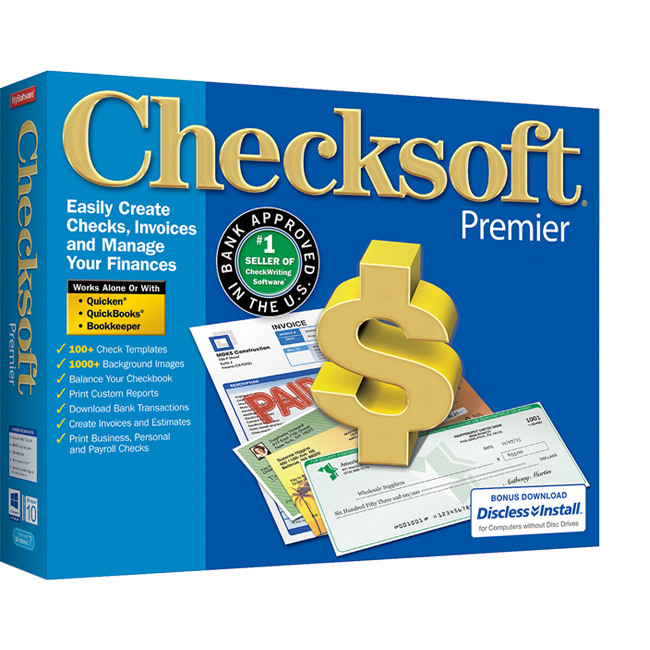
Checksoft Premier
Balance Your Checkbook With Check Printing Software
Secure Online Ordering. Our Systems are tested daily by McAfee and secured by SSL

- #1 Seller of Check Writing Software
- Easily Create Checks, Invoices & Estimates
- Design & Print Business, Personal & Payroll Checks
- 100+ Check Templates & 1,000+ Background Images
- Works With Quicken®, QuickBooks® and Bookkeeper
- Print Custom Reports
- Download Bank Transactions
- 100% Compliant With US Banks
- 175 Business Checks & 75 Personal Checks Included in Boxed Version
Secure Online Ordering. Our Systems are tested daily by McAfee and secured by SSL
Save on Check Paper!
Are you tired of running out of checks, paying too much for replenishment checks from your bank, or enduring the downtime it takes for the bank to send the checks to you? Ease your frustration with easy-to-use check design tools. Checksoft Premier helps you easily create and print business, personal, and payroll checks for multiple accounts, saves you on check paper costs, and manages your finances from one place.
- IMPROVED! User interface makes Checksoft Premier easier and more intuitive to use than ever.
- IMPROVED! Account Setup Wizard makes it easier to create and set up an account so you can start designing your checks instantly.
- IMPROVED! Check Design Wizard – Preview and select predesigned templates and insert or replace background images with ease.
- IMPROVED! Check Design Tools – An enhanced interface and better design tools make it easier to customize your check design.
- Compatible with the latest versions of QuickBooks® and Quicken®.
- NEW! Live Update Technology ensures that you get the latest version of QuickBooks® and Quicken®.
- NEW! Downloadable version is available.
Create Checks, Collect Payments & Balance Your Checkbook
Set Up Your New Account
Easily set up your business and personal checking, savings, and credit card accounts. Import data from your bank or existing financial software.†

Balance Your Checkbook
Manage your business and personal accounts in one place. Reconcile your statements. See your balances at a glance.

Print Checks & Pay Bills
Design and print personal and business checks. Choose from over 100 templates. Or customize your own.

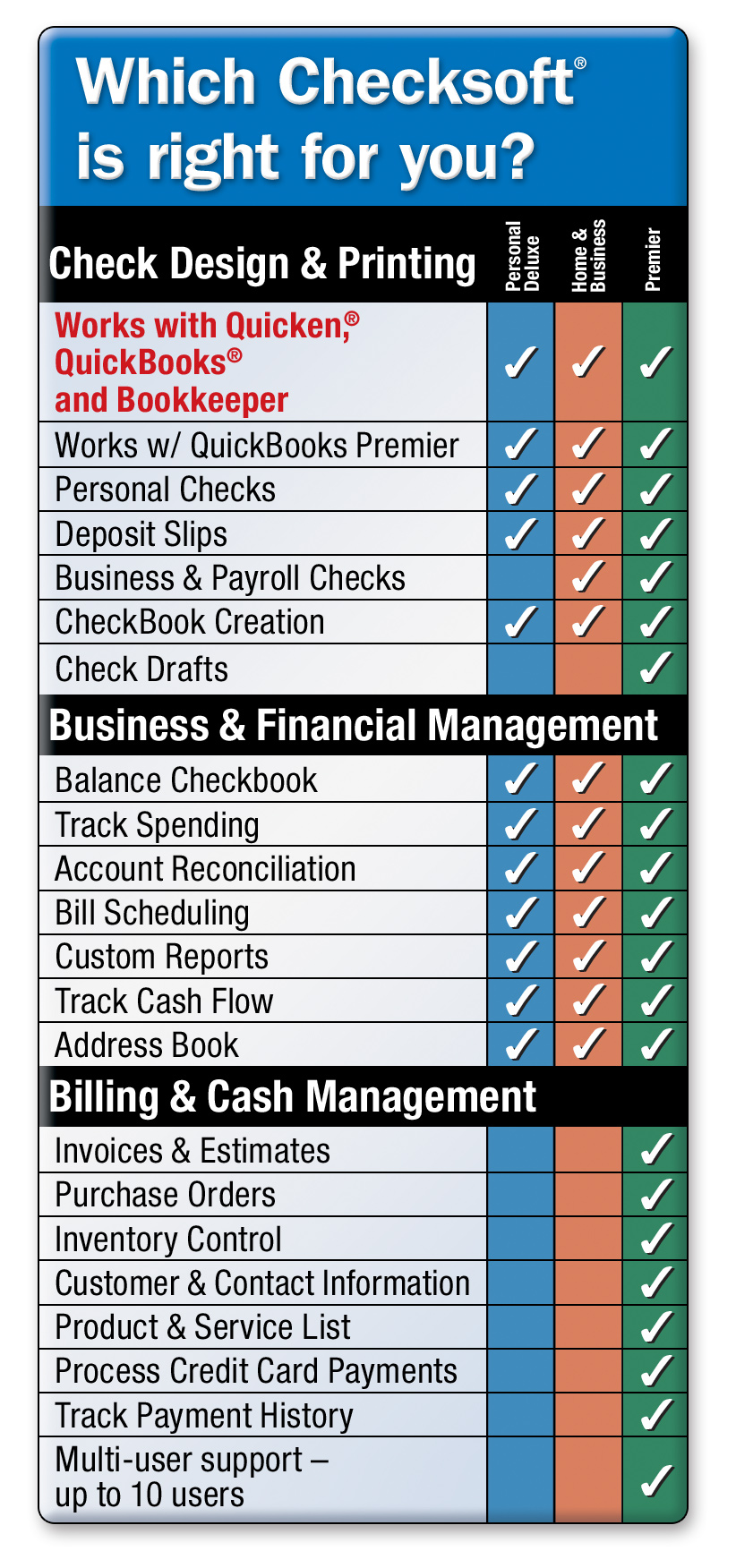
Supports Up to 10 Simultaneous Users
Streamline your check writing and printing with Check Designer. Now, up to 10 users can create and print checks concurrently using the same design file. 1 license included.

Top 5 Reasons to Create Your Own Checks
- Save Money – Save on check paper costs
- Efficiency – Create and print checks for multiple accounts
- Reduce Risk – Safeguard personal information
- Checks on Demand – Never run out of checks
- Financial Control – Manage your finances from one place
Easily Manage Accounting, Billing & Business Finances
Set Up & Reconcile Accounts
- Set up checking, savings, and credit card accounts
- View balances, upcoming bills, outstanding checks, and more
- Download bank data and reconcile your statement with the easy-to-use Reconciliation Wizard
Account Register
Get started quickly. Checksoft works just like a checkbook, making it easier to enter and edit transactions.
- Choose transaction by type, such as ATM
- Categorize and sort your data to generate more detailed reports
- Your ending balance is updated as each transaction is recorded
- Schedule bill reminders
Integrate With Your Financial Software
Monitor cash flow, track spending, schedule bills, and print reports. With Checksoft Premier, you can easily print checks from Quicken®, QuickBooks® Basic & Pro, QuickBooks Premier, and Bookkeeper software.
Create Financial Reports
Analyze your business with easy-to-read reports. Generate a wide variety of reports including Payments, Checks Printed, Expenses, and much more.
Easily Create Professional Invoices & Estimates
Customize your invoices and estimates with your customer information, calculate totals, taxes, shipping and discounts, and print with your company logo.

Get Paid on Time
Change estimates to invoices with one click. Charge interest to overdue invoices and send collection letters. Include PayPal® links in your email messages to customers.
Generate Check Drafts for Instant Deposit
Simply obtain customer bank details via email, phone or fax, create check drafts then print and deposit. No signature required!

Schedule & Track Payments
Stay on top of your bills and payments by scheduling them ahead of time. Bill Scheduler reminds you when your bills are due and automatically records them for you.

- #1 Seller of Check Writing Software*
- Save Money – Save on check paper costs
- Easy-To-Use – Just 5 minutes to learn the basics
- Efficient – Create and print checks for multiple accounts and mail with double window envelopes
- Reduce Risk – Safeguard personal and business information with password protection
- Checks on Demand – Never run out of checks
- Compliant – 100% bank approved in the U.S.***
- Integrates With Your Financial Software – Print checks directly from Quicken® & QuickBooks®
- Financial Control – Manage finances from one place
- Schedule & Track Payments & Bills – Explore ways to save money
- Download Bank Data and Reconcile Accounts – Easily reconcile your bank statement and track transactions†
- Get Paid on Time – Create invoices and estimates, check drafts for instant deposit, & include PayPal® links in emails
- Analyze your finances with easy-to read-reports
- Multi-User support – Up to 10 users can create and print checks concurrently using the same design file
- 90-day money back guarantee
Checksoft Premier Works With:
- Quicken®- versions 2004-2021
- QuickBooks® -Basic & Pro Editions 2004-2021, Premier Editions 2004-2021, Enterprise Solutions Editions 2008-2021
As later versions of the software programs are released, please check with mysoftware13 for the latest software updates.
Checksoft Compatible Checks:
- Checks Business Pack
- Checks Voucher Pack
- Checks Personal Pack
To order check paper products, go to www.mysoftwareforms.com
- Windows 10, 11
- Pentium® III or higher
- 300 MB hard disk space
- DVD-ROM drive
- Inkjet or laser printer
- Internet connection required for certain features
*NPD Group/NPD Techworld January 2007 - December 2012.
***A MICR toner cartridge is not required to print valid checks from this software. However, some financial institutions or retailers may require checks with MICR toner. If you have concerns, contact your financial institution and the retailers you patronize to inquire if MICR toner is required. If you determine that MICR toner is required on your checks, please visit www.mysoftwareforms.com.
†A QIF file format is required to import transaction data from Quicken®, credit card companies, or your bank.
Bonus: 175 business checks and 75 personal checks included in the boxed version only.